Skip to content

Menu

  • Home
  • Shop
    • My Account
    • Cart
    • Checkout
  • Pages
    • Left sidebar
    • Right sidebar
    • Gallery page
    • Google Maps page
  • Documentation
    • Mash Documentation
    • Activate Mash Pro
    • Fix activation errors
    • Customize Mash Pro
    • Customize the colors
    • Post/page slideshow
    • Add a new widget area
    • Manage the post formats
    • Start automatic updates
    • Start manually updates
  • Buy now

Copyright Mash 2026 | Theme by ThemeinProgress | Proudly powered by WordPress

Mash
  • Home
  • Shop
    • My Account
    • Cart
    • Checkout
  • Pages
    • Left sidebar
    • Right sidebar
    • Gallery page
    • Google Maps page
  • Documentation
    • Mash Documentation
    • Activate Mash Pro
    • Fix activation errors
    • Customize Mash Pro
    • Customize the colors
    • Post/page slideshow
    • Add a new widget area
    • Manage the post formats
    • Start automatic updates
    • Start manually updates
  • Buy now
  • You are here :
  • Home
  • How to activate Mash Pro theme

How to activate Mash Pro theme

Important! – The procedure for installing Avventura theme shown in the following video, is also valid for the Mable Pro theme

To download and install Mable Pro, please watch this video and follow the steps below:

Download the theme

  1. Login to ThemeinProgress with your credentials
  2. Go to the My Account > Orders page
  3. Download the theme from the dedicated button

Parent theme required

Important: Mable Pro is a child theme and requires the free Mable parent theme to be installed on your website.

In most cases, the parent theme is automatically installed by WordPress.org during the activation process. If this does not happen, you can manually download and install the Mable parent theme before activating Mable Pro.

Install and activate the theme

After downloading the theme, follow these steps:

  1. Log in to your WordPress admin dashboard
  2. Go to Appearance > Themes and select Add new theme
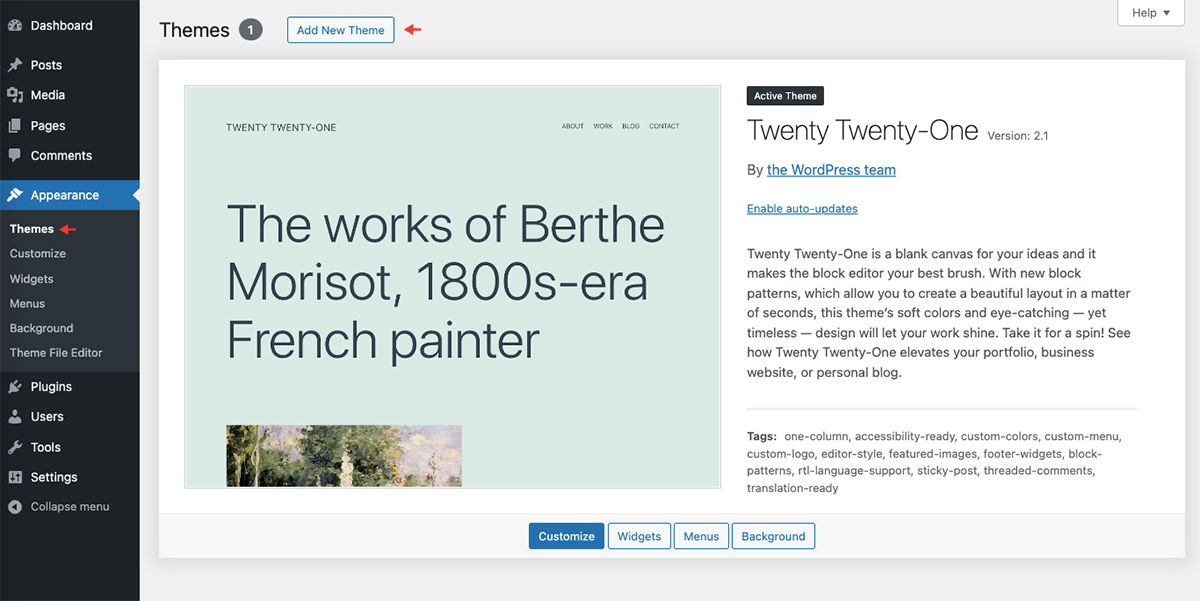
  3. Click Upload theme
  4. Choose the downloaded ZIP file and click Install Now
  5. Activate the theme after installation is complete

Activate the license key

  1. Copy the license key received after your order
  2. Log in to your WordPress admin dashboard
  3. Go to Appearance > Mable Pro license key
  4. Insert the license key copied previously, as indicated in the first point
  5. Click ‘Activate’ button
  6. Enjoy the theme 🙂

Archives

  • January 2025
  • September 2024
  • May 2024
  • April 2024
  • January 2024
  • July 2016

Calendar

October 2026
M T W T F S S
 1234
567891011
12131415161718
19202122232425
262728293031  
« Jan    

Categories

  • Aside
  • Blog

Archives

  • January 2025
  • September 2024
  • May 2024
  • April 2024
  • January 2024
  • July 2016

Categories

  • Aside
  • Blog

Recent Posts

  • Post format gallery
  • Audio post
  • Example of a post with a table of contents
  • Nam luctus elit velit, a lobortis lorem molestie id
  • Fusce at suscipit dui, varius consequat tortor

Tagcloud

Free WordPress themes

Copyright Mash 2026